
If you’re looking to avoid longer standby lines on your next Disney trip, the Lightning Lane service might be your new best friend. Disney now offers three paid options to help you spend less time waiting and more time enjoying the magic: Lightning Lane Multi Pass, Lightning Lane Single Pass, and the brand-new Lightning Lane Premier Pass. All of these can be purchased in advance, and I’ll cover each one—saving the newest addition, the Premier Pass, for the end. Let’s dive in!
What is the Lightning Lane Service?
Lightning Lane entry is a paid service that allows you to skip the standby line and enter a separate Lightning Lane for select attractions and entertainment experiences. There are three options: Lightning Lane Multi Pass, Lightning Lane Single Pass, and Lightning Lane Premier Pass. Each can be purchased and scheduled in advance of your Disney World visit.
When you book a Lightning Lane, you’ll receive a one-hour return window for that attraction. You can scan into the Lightning Lane up to 5 minutes before your scheduled time and as late as 15 minutes after. For example, if you have a 10:00–11:00 a.m. return time for Space Mountain, you can scan in anytime from 9:55 a.m. to 11:15 a.m., and the Mickey head will light up green. If you scan in after that grace period, it may light up blue and you could be denied entry.
➡️ Click here for a short overview video of Lightning Lanes

What is Lightning Lane Multi Pass?
Lightning Lane Multi Pass covers most rides with Lightning Lane access and excludes a few headliners at each park.
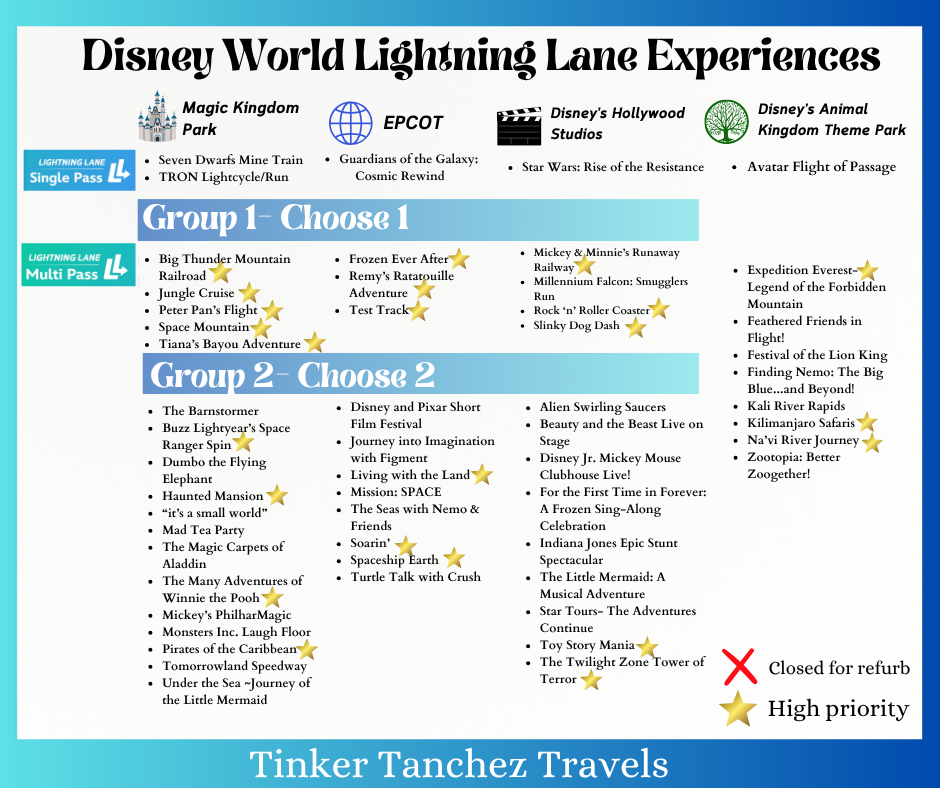
You can plan ahead and pick up to 3 Lightning Lane experiences with arrival windows in the same park. At Magic Kingdom, Hollywood Studios, and EPCOT, rides are divided into two tiers. You can select one ride from Tier 1 and two from Tier 2—or choose all three from Tier 2. Animal Kingdom has no tiers, so you can pick any 3 rides from the list.
Once you enter the park and tap into your first Lightning Lane, you can book the next one, continuing the cycle throughout the day. After tapping your first Lightning Lane, you can book rides from either tier.
Buying the Multi Pass also gives you digital downloads of select attraction photos/videos from your day, plus Disney PhotoPass Lenses. This does not include other PhotoPass pictures taken by photographers around the park.
Can you make Multi Pass selections in different parks if you plan to Park Hop?
Your first 3 Lightning Lane choices must be at the same park. If you have a Park Hopper ticket or Annual Pass, once you redeem your first Lightning Lane, you can book the next Lightning Lane in any other park via the My Disney Experience app, based on availability. There’s no extra charge for Park Hopping.
You can schedule Lightning Lanes in advance for the park you plan to hop to, if you prefer.
Pro tip: Schedule one Lightning Lane for an early time, tap into it to unlock booking in other parks. Or after tapping your first selection, you can modify your remaining ones to the next park.
What is Lightning Lane Single Pass?
Lightning Lane Single Pass lets you buy access a la carte to Disney World’s most in-demand rides that aren’t included in the Multi Pass. You can buy up to 2 Single Passes per person per day, subject to availability. With a Park Hopper or Annual Pass, you can purchase these across any parks on the same day.
Current Single Pass attractions are:
- Magic Kingdom: TRON Lightcycle/Run, Seven Dwarfs Mine Train
- EPCOT: Guardians of the Galaxy: Cosmic Rewind
- Hollywood Studios: Star Wars: Rise of the Resistance
- Animal Kingdom: Avatar Flight of Passage
Pro tip: You can now modify Single Pass bookings! Change your timeslot or swap to another attraction by paying the difference if it’s more expensive. No refunds if it’s less.
Which rides are included in Multi Pass and Single Pass?
Below is the current list of rides for each option:
What is Lightning Lane Premier Pass?
Lightning Lane Premier Pass lets you skip the line at every Lightning Lane attraction, covering both Multi and Single Pass options. It costs more than the other passes but doesn’t require any scheduling. Simply buy the Premier Pass for one park per day and enter any Lightning Lane attraction whenever you want. You can use it once per attraction.
The Premier Pass is only valid at one park per day and cannot be used when Park Hopping.
With the Premier Pass, there is no need to book arrival windows. Just walk up to the Lightning Lane, scan your ticket, and enter. It also includes Disney PhotoPass Lenses and digital downloads of select attraction photos and videos.
How much do the Multi Pass, Single Pass, and Premier Pass cost?
Prices vary by date and park, rising on busy days like holidays and school breaks.
Here are some example prices for May 23, 2026:
Lightning Lane Multi Pass
- Magic Kingdom: $32 per person
- EPCOT: $24 per person
- Hollywood Studios: $32 per person
- Animal Kingdom: $17 per person
Lightning Lane Single Pass
- Magic Kingdom: Seven Dwarfs Mine Train $13, TRON Lightcycle/Run $21
- EPCOT: Guardians of the Galaxy: Cosmic Rewind $19
- Hollywood Studios: Star Wars: Rise of the Resistance $24
- Animal Kingdom: Avatar Flight of Passage $16
Lightning Lane Premier Pass (per person, per park):
- Magic Kingdom: $399
- EPCOT: $219
- Hollywood Studios: $319
- Animal Kingdom: $159
When can I purchase Lightning Lane passes?
You must have valid park admission, a linked Disney resort reservation (if staying at a Disney Resort), and, depending on your ticket, a park reservation to buy Lightning Lane passes. All purchases open at 7 a.m. EST on your first day of eligibility through the My Disney Experience app.
- On-site guests (Walt Disney World Resort, Dolphin, Swan, Swan Reserve, Shades of Green) can buy Multi, Single, and Premier Passes up to 7 days before check-in, for their full stay (up to 14 days). You buy passes for all days in one transaction per day.
- Off-site guests with date-based tickets can buy passes starting 3 days before their visit, for all valid days.
- Annual Passholders and other ticket types not staying on-site must buy passes one day at a time, starting 3 days before their visit.
You must book all Multi Pass selections in the same park. Single Passes can be booked across different parks if you have a Park Hopper. Premier Pass is valid for one park only per day.
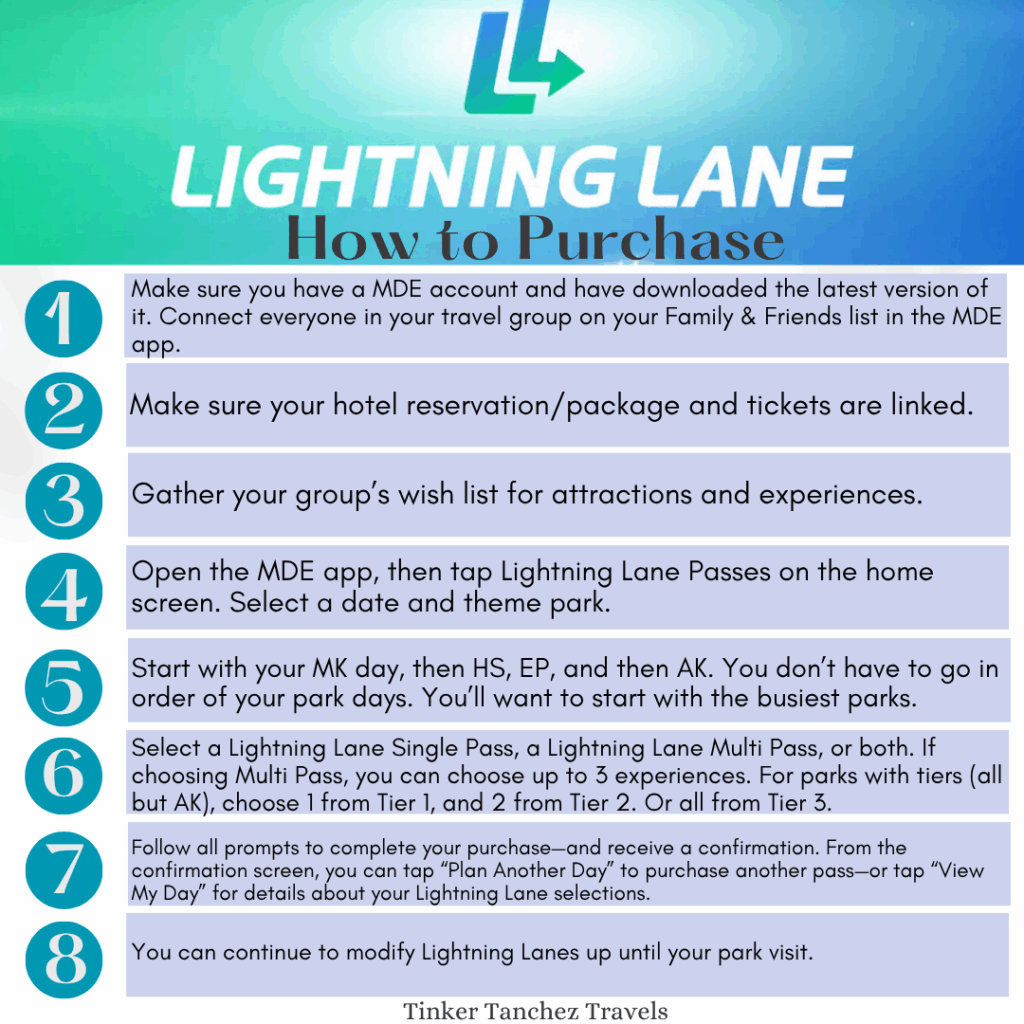
How do I book Lightning Lane passes?
All passes are booked via the My Disney Experience app.
Note: If you have dining reservations, Lightning Lane return times during that window may not be available. Early meals can push your Lightning Lane times later. You can adjust dining times or book later Lightning Lane windows as needed.
For early park arrivals, it’s smart to book the earliest Lightning Lane times possible so you can tap in and keep booking more throughout the day.
Can I see what’s available before purchasing Multi or Single Passes?
Yes, you can view the available rides and time options before buying Multi or Single Passes. For Premier Passes, availability isn’t an issue since you can enter Lightning Lanes anytime during the day.
How do I use Lightning Lane Multi, Single, or Premier Pass?
At your scheduled arrival time, go to the Lightning Lane entrance of your selected attraction. To redeem, tap your MagicBand, MagicBand+, Disney MagicMobile pass, Key to the World Card, or ticket card linked to your valid park admission.

Can I change or modify a Lightning Lane?
Yes. You can modify your selection in the My Disney Experience (MDE) app until you redeem your first Lightning Lane of the day. Just go to the Lightning Lane Passes section on the app’s home screen to view and change your plans, including park or date, up until the arrival window starts.
If you switch to a more expensive date or park, you’ll need to pay the difference.
Can I make different Lightning Lane Multi Pass selections for some of my group?
Yes. When purchasing Multi Passes, you choose up to 3 attractions for everyone in your group initially. After purchase, you can modify selections and arrival windows for some group members separately, subject to availability.
Can I book the same attraction multiple times with Lightning Lane?
No. You can only use Lightning Lane once per attraction. You can always join the standby line to ride again.
Is there still a Virtual Queue?
Disney is not currently using a Virtual Queue for anything. Rides like Tiana’s Bayou Adventure and Guardians of the Galaxy: Cosmic Rewind now have standby lines and Lightning Lane access.
Do I have to use Lightning Lane passes?
No. You can tour the parks using standby lines only. Having Lightning Lane Multi Pass (LLMP) makes it easier to ride more attractions, especially popular ones, but it’s not required. Without it, focus on Early Entry for Disney Resort guests, arriving at park opening or staying late, or visiting during nighttime shows.
We recommend using LLMP at Magic Kingdom and Hollywood Studios to maximize popular rides.
Can I get a refund if I cancel my trip after purchasing?
No. Lightning Lane passes are nonrefundable and nontransferable. Availability varies by date and is not guaranteed.
What are the pros and cons of LLMP and LLSP?
Advantages:
- Book your Lightning Lanes before your trip
- After tapping into one, you can immediately book another
- After the first tap, you can book rides from either Tier 1 or Tier 2
Disadvantage:
- You cannot stack Lightning Lanes for later like Genie+ allowed. If you arrive late, you’ll have fewer options since later times tend to sell out.
When can international guests buy Lightning Lane?
International guests can only purchase Lightning Lane passes once they arrive in the United States because the MDE app only works within the U.S.
Tips for using Lightning Lane Multi Pass and Single Pass
- Book your hardest-to-get Lightning Lanes on your last park day to have better availability. For example, make Hollywood Studios your final park day since rides like Slinky Dog are highly sought-after.
- Focus on high-priority rides marked with stars in the attraction list.
- Keep refreshing or modifying your Lightning Lane selections throughout the day. People change plans, and sold-out options may become available again.
- Book early return times and arrive at the park early. After tapping your first Lightning Lane, you can keep booking more throughout the day.
Other important notes:
- After tapping your first Lightning Lane, you can modify your remaining ones, even across parks if you have a Park Hopper.
- If your first booked attraction goes down, it converts to “Any Time,” and you must tap your second booked Lightning Lane to continue booking or modifying others.
- Multiple daily Lightning Lane purchases may trigger credit card fraud alerts, so have backup cards ready.
Final thoughts:
The new system makes touring more efficient, and the benefits outweigh the inability to stack passes. Planning your days ahead will make your trip smoother. If you find this overwhelming, feel free to reach out with any questions.
Why book your Disney trip with me?
I have extensive experience booking Lightning Lanes and Virtual Queues. I offer complimentary booking of Lightning Lane Multi and Single Passes exclusively for my clients on a first-come, first-served basis.
If you’re interested, contact me for a quote. After booking your trip, I’ll schedule time to handle your Lightning Lane bookings.
Note: Clients must purchase Lightning Lane Multi, Single, or Premier Passes to receive my complimentary booking service.
I hope you find this helpful! Don’t hesitate to reach out with any questions.
Ready to plan your visit to the magic? Email me for a no-obligation quote, and I’ll help you plan the most magical vacation! My services are complimentary when you book with me, including all my tips and advice.
For a quick quote, please fill out this form.
Don’t forget to follow us on Facebook for all the latest blogs and news!
 using WordPress and
Comments are closed